Tracker Connections
Reality Field can connect to many different motion tracker systems simultaneously. There is no limit to the number of trackers. Trackers serve as the main "container" of information in Reality Field, and the program flow is based around them.
System-Level Trackers
Some systems require a host program to be running and communicating on the local PC. SteamVR and Antilatency are two examples. These kinds of trackers must be manually enabled upon startup, and if their host software is not running, the program will crash. These must be explicitly enabled on the splash screen at launch.
Network Trackers
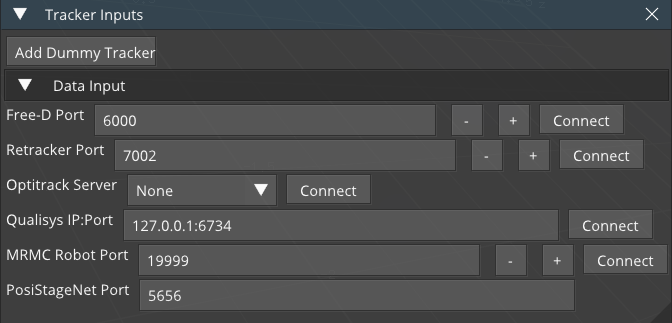
Tracker data that comes in via a network connection can be connected to in the Input panel in the bottom right.
Typing an IP address or port and pressing Enter will cause RF to automatically connect or listen.
Some tracking systems have default ports or IP addresses. In this case, only the IP Address or port is required.
Optitrack uses an auto-discovery service.
Free-D is customized on a vendor-specific basis. It's very probable that your trackers movements will be incorrect when brought into Reality Field, and you will need to use the axis mapping to correct them on the output.
Dummy Tracker
Clicking Dummy Tracker will create a tracker that can be used as a data container. This can be used for testing, or for mixing camera/lens data when tracking is not needed.